


集合
特点:自动扩容,可以储存引用类,如果存储基本数据类型需要变成包装类
ArrayList集合
package com.wsj.test7;

import java.util.ArrayList;

public class arratlistdemo1 {
    public static void main(String[] args) {
        ArrayList<String> list=new ArrayList<>();
        //添加
        list.add("22");
        list.add("22");
        //删除
        boolean flag=list.remove("22");

        System.out.println(list);
        System.out.println(flag);

        //修改元素
        list.set(0,"ddd");
        System.out.println(list);
        for(int i=0;i<list.size();i++){
            String s=list.get(i);
            System.out.println(s);
        }
    }
}
| 方法 | 描述 |
|---|---|
| add() | 将元素插入到指定位置的 arraylist 中 |
| addAll() | 添加集合中的所有元素到 arraylist 中 |
| clear() | 删除 arraylist 中的所有元素 |
| clone() | 复制一份 arraylist |
| contains() | 判断元素是否在 arraylist |
| get() | 通过索引值获取 arraylist 中的元素 |
| indexOf() | 返回 arraylist 中元素的索引值 |
| removeAll() | 删除存在于指定集合中的 arraylist 里的所有元素 |
| remove() | 删除 arraylist 里的单个元素 |
| size() | 返回 arraylist 里元素数量 |
| isEmpty() | 判断 arraylist 是否为空 |
| subList() | 截取部分 arraylist 的元素 |
| set() | 替换 arraylist 中指定索引的元素 |
| sort() | 对 arraylist 元素进行排序 |
| toArray() | 将 arraylist 转换为数组 |
| toString() | 将 arraylist 转换为字符串 |
| ensureCapacity() | 设置指定容量大小的 arraylist |
| lastIndexOf() | 返回指定元素在 arraylist 中最后一次出现的位置 |
| retainAll() | 保留 arraylist 中在指定集合中也存在的那些元素 |
| containsAll() | 查看 arraylist 是否包含指定集合中的所有元素 |
| trimToSize() | 将 arraylist 中的容量调整为数组中的元素个数 |
| removeRange() | 删除 arraylist 中指定索引之间存在的元素 |
| replaceAll() | 将给定的操作内容替换掉数组中每一个元素 |
| removeIf() | 删除所有满足特定条件的 arraylist 元素 |
| forEach() | 遍历 arraylist 中每一个元素并执行特定操作 |
底层基本原理
- 利用空参创建的集合,默认创建一个默认长度为0的数组
- 添加第一个元素的时候,创建一个新的长度为10的数组
- 存满时,会扩容1.5倍
- 如果一次性添加多个元素,大于1.5倍,数组的长度以实际情况为准
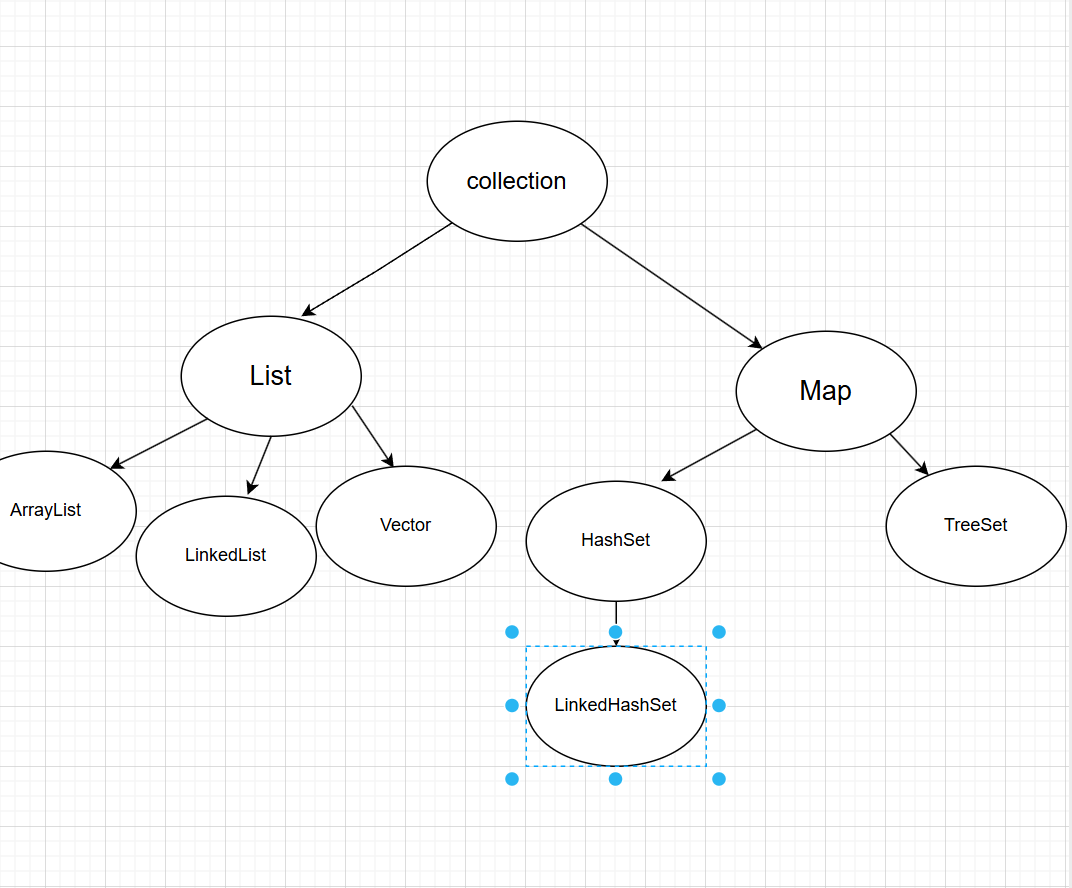
集合体系结构
collection:单列集合
Map:双列集合
List系列集合:添加的元素是有序、可重复、有索引
Set系列集合:添加的元素是无序、不重复、无索引
Collection
单列集合的祖宗接口,它的功能是全部单列集合都可以继承使用的
public static void main(String[] args) {
        Collection<String> col=new ArrayList<>();
        //如果往List集合中添加元素。方法永远返回true
        //在Set集合中添加数据,如果不重复返回true.否则返回false
        col.add("a");
        col.add("b");
        col.add("c");
        System.out.println(col);
//        col.clear();
        System.out.println(col);
        col.remove("a");
        System.out.println(col);
        //底层依赖equals方法进行判断是否存在
        boolean result=col.contains("a");
    }
如果比较自定义数据类型,需要重写equals方法
collection的通用遍历方法
迭代器遍历
public static void main(String[] args) {
        Collection<String> col=new ArrayList<>();
        col.add("a");
        col.add("b");
        col.add("c");
        Iterator<String> it=col.iterator();
        while(it.hasNext()){
            String str=it.next();
            System.out.println(str);
        }
    }
遍历后指针不会复原
增强for遍历
为了简化迭代器代码
原理是一个iterator迭代器
所有的单列集合和数组才能使用增强for来进行遍历
Collection<String> col=new ArrayList<>();
        col.add("a");
        col.add("b");
        col.add("c");
        for(String s:col){
            System.out.print(s);
        }
Lambda表达式遍历
public static void main(String[] args) {
        Collection<String> col = new ArrayList<>();
        col.add("a");
        col.add("b");
        col.add("c");
//        col.forEach(new Consumer<String>() {
//            @Override
//            //s依次表示集合中的每一个数据
//            public void accept(String s) {
//                System.out.println(s);
//            }
//        });
        col.forEach(s ->
                System.out.println(s));

    }
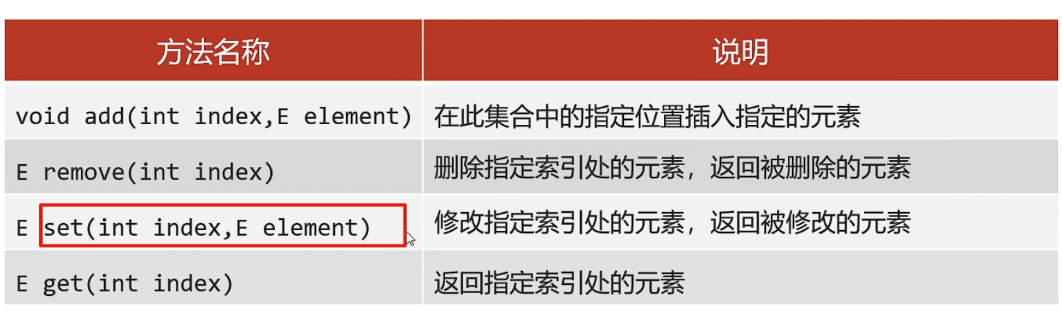
List集合的方法
泛型深入
泛型格式:<数据类型>
注意:泛型只能支持引用数据类型
好处:
统一数据类型
把运行时期的问题提前到了编译期间,避免了强制类型转换出现的异常,因为在编译阶段类型就能确定下来
方法泛型
定义在类中的泛型所有方法都能使用
定义在方法中的泛型只能本方法使用
接口泛型
实现类给出具体类型
实现类延续泛型,创建实现类对象时再确定类型
泛型的通配符
如果类型不确定,但是能知道以后只能传递某个继承体系中的,就可以使用泛型的通配符
Set集合
无序:存取顺序不一致
不重复:可以去除重复
无索引:不能通过for循环遍历,不能通过索引获取元素
Set实现的集合类
HashSet:无序、不重复、无索引
LinkedHashSet:有序、不重复、无索引
TreeSet:可排序、不重复、无索引
HashSet
底层采取哈希表存储数据
组成:
数组+链表+红黑树
哈希值:
根据hashCode方法算出来的int类型整数
一般会重写hashCode方法,利用对象内部的属性值计算哈希值
对象的哈希值特点:
如果没有重写hashCode方法,不同对象计算的哈希值是不同的
如果已经重写了Hashcode方法,不同的对象只要属性值相同,计算出的哈希值就是一样的
在小部分情况下,不同的属性值或者不同的地址值计算出来的哈希值也有可能一样
public int hashCode() {
        return Objects.hash(name, age);
    }
Student s1=new Student("zz",22);
        Student s2=new Student("zz",22);

        System.out.println(s1.hashCode());
        System.out.println(s2.hashCode());
底层原理:
创建一个默认长度为16,默认加载因子为0.75的数组,数组名为table
根据元素的哈希值和数组的长度计算出应该存入的位置
判断当前的位置是否为null,如果是null直接存入
如果位置不为null,表示有元素,则调用equals方法比较属性值
一样:不存
不一样:存入数组,形成链表
当链表长度超过8,而且数组长度大于等于64时,自动转换为红黑树
LinkedHashSet
底层结构依然是哈希表,只是每个元素有额外多了一个双链表记录存储的数据
如果要求去重且存取有序,才使用LinkedHashSet
TreeSet
特点:不重复,无索引,可排序
可排序:按照元素的默认规则排序
底层基于红黑树结构进行排序
默认规则:
对于数值类型:Integer,Double,默认按照从小到大的顺序进行排序
对于字符,字符串类型:按照字符串在ASCII码表中升序进行排序
TreeSet<Integer> ts=new TreeSet<>();
        ts.add(1);
        ts.add(2);
        ts.add(3);
        ts.add(4);
        Iterator<Integer> it=ts.iterator();
        while(it.hasNext()){
            int i=it.next();
            System.out.println(i);
        }
        for(int j:ts){
            System.out.println(j);
        }
        ts.forEach(integer -> System.out.println(integer));
两种比较方式
方式一:
默认排序规则
Student重写Compare接口的方法
public int compareTo(Student o) {
        //指定排序规则
        System.out.println("this:"+this);
        System.out.println("o:"+o);
        return this.getAge()-o.getAge();
    }
public int compareTo(Student2 o) {
        int sum1=this.getEnglish()+this.getChinese()+this.getMath();
        int sum2=o.getEnglish()+o.getChinese()+o.getMath();
        int i=sum1-sum2;
        i=i==0?this.getChinese()-o.getChinese():i;
        i=i==0?this.getEnglish()-o.getEnglish():i;
        i=i==0?this.getMath()-o.getMath():i;
        i=i==0?this.getAge()-o.getAge():i;
        i=i==0?this.getName().compareTo(o.getName()):i;
        return i;

    }
方式二:
创建集合时,自定义Comparator比较器对象,指定比较规则
public static void main(String[] args) {
        TreeSet<String> ts=new TreeSet<>(new Comparator<String>() {
            @Override
            public int compare(String o1, String o2) {
                //按照长度进行排序
                int i= o1.length()-o2.length();
                i=i==0? o1.compareTo(o2):i ;
                return i;

            }
        });
        ts.add("c");
        ts.add("ab");
        ts.add("df");
        ts.add("qwer");

        System.out.println(ts);
    }
如果两个规则同时存在以比较器对象为基准
总结:
想要集合中的元素可重复
用ArrayList集合
想要集合中的元素可以重复,且当前的增删操作明显多于查询
用LinkedList集合
如果想对集合中的元素进行去重
用HashSet集合,基于哈希表的
如果想对集合的元素进行去重,而且保证存取顺序
用LinkedList集合,基于哈希表和双链表,效率低于HashSet
如果相对集合中的元素进行排序
使用TreeSet集合
Map集合
Map集合的所有键是不允许重复的,但值是可以重复的,键和值是一一对应的,每一个键对应一个值
HashMap:无序,不重复,无索引
LinkedHashMap:有序,不重复,无索引
TreeMap:按照大小升序排序,不重复,无索引
public static void main(String[] args) {
        Map<String,Integer> map=new HashMap<>();
        map.put("zs",22);
        map.put("ws",23);
        map.put("rt",33);
        map.put("wf",33);
        map.put("ww",33);
        map.put("null",null);
        System.out.println(map);

        System.out.println(map.size());

        System.out.println(map.get("zs"));

        map.remove("zs");

        System.out.println(map.containsKey("zs"));
        System.out.println(map.containsValue(23));

        System.out.println(map.keySet());
        System.out.println(map.values());
    }
遍历方式
第一种:取出键值,遍历数据
Set<String> keys=map.keySet();
        for(String key:keys){
            Integer i=map.get(key);
            System.out.println(i);
        }
第二种:整体遍历
Set<Map.Entry<String,Integer>> entries=map.entrySet();
        for(Map.Entry<String,Integer> me:entries){
            String i=me.getKey();
            Integer j=me.getValue();
            System.out.println(i+j);
        }
第三种Lambda表达式
map.forEach((s,integer)-> System.out.println(s+integer));